

Key Capabilities
Criteria Definition
Define criteria as strategic topics, themes, or initiatives. Manage your criteria library as your strategy evolves. Describe what each criterion means in business terms.
Automatic Scoring
Scores derived from enrichment data, jobs, tech stack, financials, and public intelligence. Scheduled scoring updates keep criteria current as data changes.
Query Configuration
Configure how each criterion evaluates accounts. Group related queries together. Fine-tune which data sources and signals feed into each criterion.
What Insight Scores Tell You
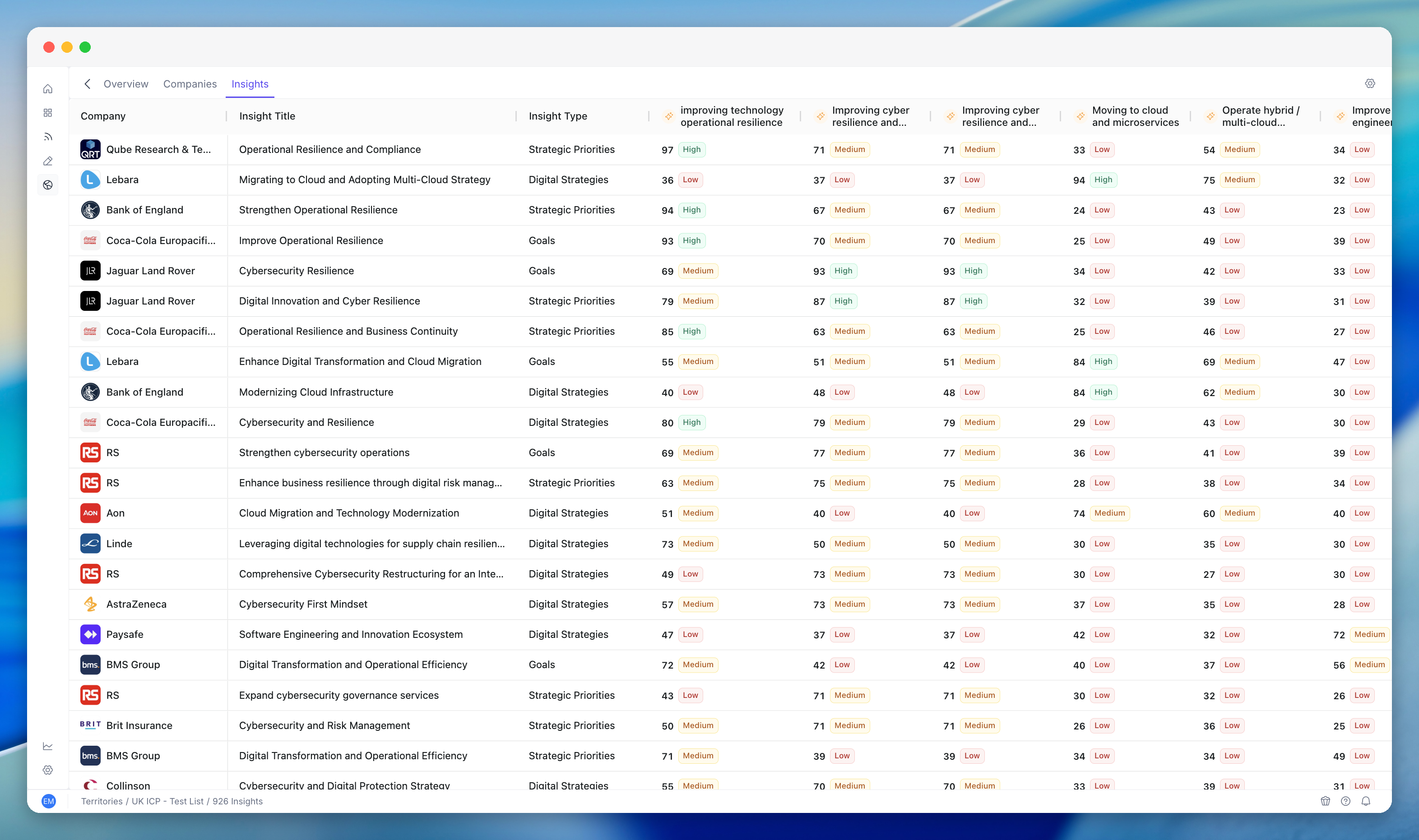
Each account in your territory has a score for every insight criterion you’ve defined. If you’ve set up criteria like “DevOps Transformation” and “Global Expansion”, every account gets scored on both.- A high score means the account shows strong signals related to that topic - they’re hiring for it, investing in it, or publicly talking about it.
- A low score means little to no evidence of activity related to that topic.
Viewing Insight Scores
In the Territory Insights Tab
Open your territory and switch to the Insights tab. This shows criteria scores aggregated across all territory accounts - which strategic topics your territory is most aligned with overall.In the Territory Companies Table
Insight scores can appear as columns in the Companies table. If insight criteria are enabled in your territory’s Enriched Columns settings (type: Insights), the scores show alongside other account data.On Individual Account Profiles
Click into any account to see per-criterion scores in the account profile. This shows you exactly how each account scores against each strategic topic.Common Workflows
Understanding Why an Account Scores High
1
Open the account profile
Navigate to the account you want to investigate.
2
Review per-criterion insight scores
Identify which criteria the account scores highest on.
3
Understand the signals
A high score on “Platform Engineering Transformation” means the account is showing signals - hiring platform engineers, adopting relevant tech, publishing content about platform engineering.
4
Cross-reference with other data
Check Jobs data and Tech Stack to see the specific evidence driving the score.
Comparing Accounts on a Specific Topic
1
Open the Companies table
Navigate to your territory’s Companies tab.
2
Sort by the criterion column
If the criterion’s insight score is visible as a column, sort by it.
3
Review the ranking
See which accounts are strongest and weakest on that specific topic.
4
Focus your outreach
Prioritise accounts where your value proposition is most relevant.
Spotting Opportunities Across Criteria
1
Review the Insights tab
Look for territory-wide patterns across all criteria.
2
Identify broad themes
If “Software Delivery Acceleration” scores high across many accounts, that’s a theme you can build messaging around.
3
Find targeted opportunities
If “Global Expansion” scores high for only a few accounts, those are targeted opportunities worth specific attention.
Using Insight Scores in Conversations
Insight scores give you specifics for personalised outreach:- “I noticed your company is investing heavily in DevOps transformation - we help companies at this stage by…”
- “Your hiring signals suggest you’re accelerating platform engineering - here’s how we can help…”
Interpreting Scores
Scores are relative, not absolute. An 80 means strong signals compared to other accounts, not that 80% of some measure is met.
Tips and Best Practices
Don’t rely on a single criterion - look at the pattern across multiple criteria to build a full picture of an account.
- Use criteria scores in scoring models - insight scores are most powerful when they feed into scoring models, where they’re combined with other signals for an overall account rank.
- Review criteria quarterly - strategic priorities shift. Update your insight criteria to match your current GTM focus.
- Share insights with reps - insight scores give AEs a reason to reach out. Make sure they know how to find and interpret them.
Related Modules
Scoring Models
Insight scores are a primary input to scoring model rules.
Territory Management
Criteria are scoped to territories.
Territory Enrichment
Enrichment data feeds the signals that criteria scores are derived from.
Territory Analytics
Insight scores surface in analytics views.