> ## Documentation Index
> Fetch the complete documentation index at: https://docs.getpg.ai/llms.txt
> Use this file to discover all available pages before exploring further.
# Territory Enrichment
> Run enrichment scoped to a territory - batch enrich all accounts against the data points you need, track every run, and see exactly what was enriched.
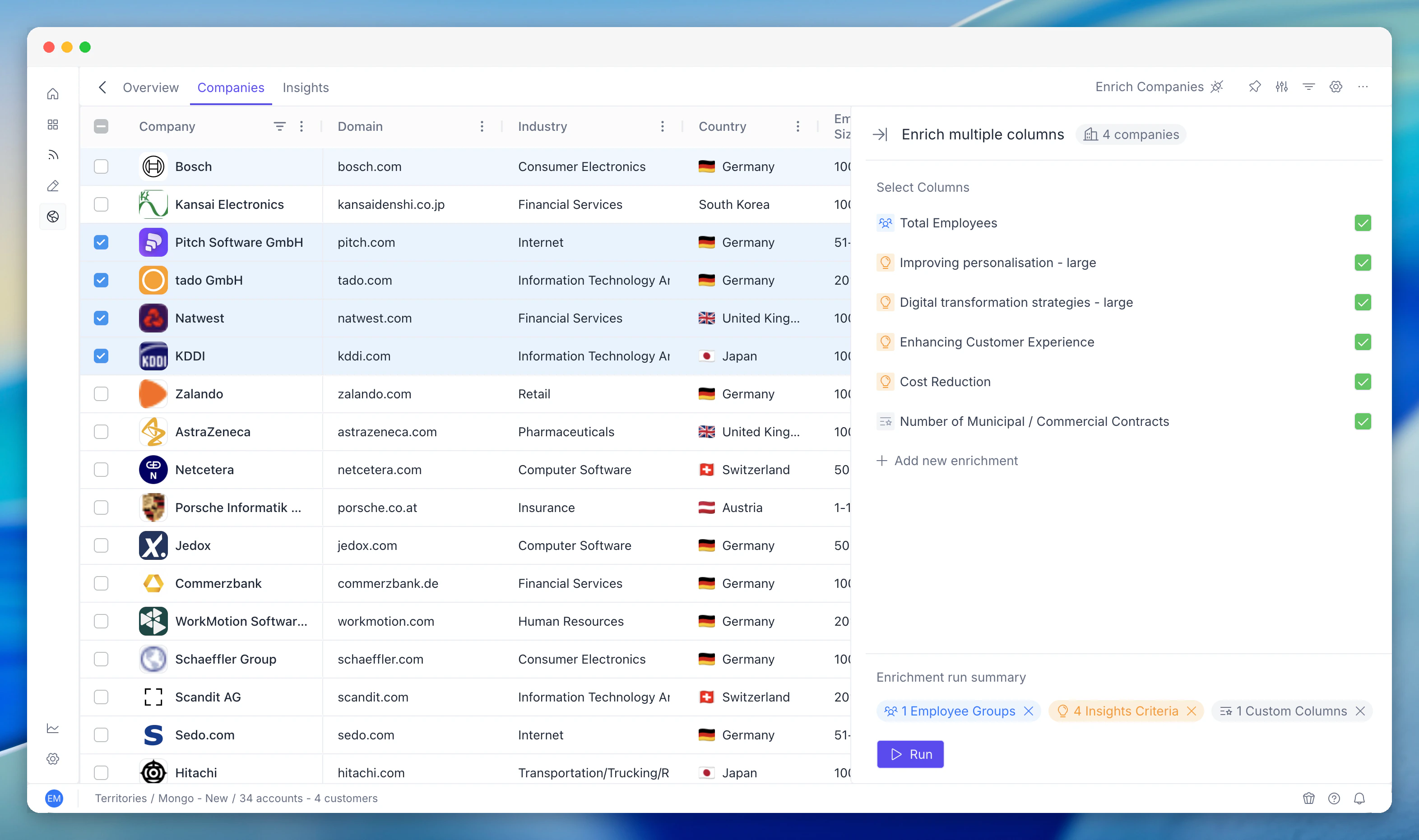
Territory Enrichment lets you run enrichment scoped to a specific territory. You select a territory, choose which enrichment types to run (tech stack, financials, jobs, contacts, insights), and trigger a batch run. The platform queues enrichment jobs for every account, respects rate limits and credit budgets, and processes them in the background. Enrichment results flow into every other module: insight scores recalculate, scoring models update, job data refreshes, and custom columns re-evaluate. Territory Enrichment is the engine that keeps territory data fresh.
 ## Key Capabilities
Enable or disable specific enrichment types per territory. Trigger batch enrichment across all accounts. Available types include tech stack, financials, jobs, contacts, and insights.
Track every enrichment run with status, timing, and results. Drill into individual jobs to see what succeeded, failed, or is pending. Analyse territory enrichment coverage.
Enrichment data feeds directly into account-level insights. Insights refresh automatically as enrichment completes.
## What Enrichment Does
Enrichment is the process by which PG:AI gathers external data for every account in your territory. Instead of relying only on basic firmographic data (company name, size, industry), enrichment adds layers of intelligence:
* **Insight scores** - how each account aligns to your strategic topics
* **Employee groups** - who works there and in what roles
* **Jobs** - what they're hiring for right now
* **Tech stack** - what technologies they use
* **Public intelligence** - news, funding, partnerships, and other signals
This enriched data feeds into scoring models and drives the PG:AI Score.
## How Enrichment Runs
Enrichment is configured at the territory level by your admin. Key things to know:
* **Enrichment runs automatically** - once configured, PG:AI enriches accounts on a schedule without manual intervention.
* **It's cumulative** - each enrichment run adds to and updates the existing data. It doesn't start from scratch.
* **Some data changes frequently** - job postings and news update often. Employee data and tech stack change more slowly.
* **New accounts get enriched** - when accounts are added to the territory, they're queued for enrichment.
## Viewing Enriched Data
### In the Companies Table
Enriched data appears as columns in the table. Depending on your territory's Enriched Columns configuration, you might see:
* Insight score columns (one per criterion)
* Employee group count columns (one per group)
* Job posting columns
* Tech stack and other enrichment columns
Use the column selector to show the enrichment columns most relevant to your work.
### On Account Profiles
Click into any account to see the full enrichment detail - all insight scores, all employee groups, all job postings, tech stack, and any other enriched data. This is the richest view.
## Common Workflows
### Checking Enrichment Freshness
Look at the enrichment status or last-enriched date on accounts (if visible).
Recently enriched accounts have the most current data.
If an account hasn't been enriched recently and you're about to engage, ask your admin to trigger a refresh.
### Acting on Newly Enriched Data
After an enrichment run:
Scores may have shifted - sort the Companies table to see the new ranking.
Look for accounts that moved up significantly - these are newly surfaced opportunities.
Check for accounts that dropped - investigate why (lost a key employee group? Stopped hiring?).
Check insight scores for recently added criteria.
### Understanding Data Gaps
Not every account will have complete enrichment:
* **Small companies** may have limited public data, leading to lower enrichment coverage.
* **Private companies** may have less available information than public ones.
* **New accounts** may not yet have been enriched (check the enrichment schedule).
A lower PG:AI Score might reflect incomplete data rather than poor fit. Always check what data is actually available before dismissing an account.
## Enrichment Types at a Glance
| Enrichment type | What it provides | How often it changes |
| ---------------------- | -------------------------------------------- | -------------------- |
| **Strategic insights** | Topic-based scoring from public intelligence | Weekly to monthly |
| **Employee groups** | Role and function composition | Monthly |
| **Jobs** | Active job postings and hiring signals | Weekly |
| **Tech stack** | Technologies and tools in use | Monthly to quarterly |
| **Firmographic** | Revenue, employee count, industry, location | Quarterly |
## Tips and Best Practices
**Don't wait for enrichment to engage** - if you have a meeting tomorrow, use whatever data is available. Enrichment is for systematic prioritisation, not a prerequisite for every action.
**Enrich before territory reviews** - if you're doing a QBR or territory review, ask your admin to run enrichment beforehand so you're working with the freshest data.
* **Report data quality issues** - if you see obviously wrong data (wrong industry, wildly off employee count), flag it. This helps improve the enrichment quality for everyone.
* **Combine enrichment with your own intelligence** - PG:AI enrichment is comprehensive, but you know things the platform doesn't (relationship history, verbal commitments, internal champions). Layer both.
* **Understand what drives your score** - the score is only as good as the enrichment behind it. If insight scores aren't populated (criteria not configured) or jobs aren't being tracked, the score won't reflect reality.
## Related Modules
Enrichment data feeds the signals that criteria scores are derived from.
Enrichment updates the data that scoring rules evaluate.
Job data is one of the enrichment types that territory enrichment runs.
AI enrichment for custom columns is a related enrichment path.
Enrichment status and coverage surface in analytics.
## Key Capabilities
Enable or disable specific enrichment types per territory. Trigger batch enrichment across all accounts. Available types include tech stack, financials, jobs, contacts, and insights.
Track every enrichment run with status, timing, and results. Drill into individual jobs to see what succeeded, failed, or is pending. Analyse territory enrichment coverage.
Enrichment data feeds directly into account-level insights. Insights refresh automatically as enrichment completes.
## What Enrichment Does
Enrichment is the process by which PG:AI gathers external data for every account in your territory. Instead of relying only on basic firmographic data (company name, size, industry), enrichment adds layers of intelligence:
* **Insight scores** - how each account aligns to your strategic topics
* **Employee groups** - who works there and in what roles
* **Jobs** - what they're hiring for right now
* **Tech stack** - what technologies they use
* **Public intelligence** - news, funding, partnerships, and other signals
This enriched data feeds into scoring models and drives the PG:AI Score.
## How Enrichment Runs
Enrichment is configured at the territory level by your admin. Key things to know:
* **Enrichment runs automatically** - once configured, PG:AI enriches accounts on a schedule without manual intervention.
* **It's cumulative** - each enrichment run adds to and updates the existing data. It doesn't start from scratch.
* **Some data changes frequently** - job postings and news update often. Employee data and tech stack change more slowly.
* **New accounts get enriched** - when accounts are added to the territory, they're queued for enrichment.
## Viewing Enriched Data
### In the Companies Table
Enriched data appears as columns in the table. Depending on your territory's Enriched Columns configuration, you might see:
* Insight score columns (one per criterion)
* Employee group count columns (one per group)
* Job posting columns
* Tech stack and other enrichment columns
Use the column selector to show the enrichment columns most relevant to your work.
### On Account Profiles
Click into any account to see the full enrichment detail - all insight scores, all employee groups, all job postings, tech stack, and any other enriched data. This is the richest view.
## Common Workflows
### Checking Enrichment Freshness
Look at the enrichment status or last-enriched date on accounts (if visible).
Recently enriched accounts have the most current data.
If an account hasn't been enriched recently and you're about to engage, ask your admin to trigger a refresh.
### Acting on Newly Enriched Data
After an enrichment run:
Scores may have shifted - sort the Companies table to see the new ranking.
Look for accounts that moved up significantly - these are newly surfaced opportunities.
Check for accounts that dropped - investigate why (lost a key employee group? Stopped hiring?).
Check insight scores for recently added criteria.
### Understanding Data Gaps
Not every account will have complete enrichment:
* **Small companies** may have limited public data, leading to lower enrichment coverage.
* **Private companies** may have less available information than public ones.
* **New accounts** may not yet have been enriched (check the enrichment schedule).
A lower PG:AI Score might reflect incomplete data rather than poor fit. Always check what data is actually available before dismissing an account.
## Enrichment Types at a Glance
| Enrichment type | What it provides | How often it changes |
| ---------------------- | -------------------------------------------- | -------------------- |
| **Strategic insights** | Topic-based scoring from public intelligence | Weekly to monthly |
| **Employee groups** | Role and function composition | Monthly |
| **Jobs** | Active job postings and hiring signals | Weekly |
| **Tech stack** | Technologies and tools in use | Monthly to quarterly |
| **Firmographic** | Revenue, employee count, industry, location | Quarterly |
## Tips and Best Practices
**Don't wait for enrichment to engage** - if you have a meeting tomorrow, use whatever data is available. Enrichment is for systematic prioritisation, not a prerequisite for every action.
**Enrich before territory reviews** - if you're doing a QBR or territory review, ask your admin to run enrichment beforehand so you're working with the freshest data.
* **Report data quality issues** - if you see obviously wrong data (wrong industry, wildly off employee count), flag it. This helps improve the enrichment quality for everyone.
* **Combine enrichment with your own intelligence** - PG:AI enrichment is comprehensive, but you know things the platform doesn't (relationship history, verbal commitments, internal champions). Layer both.
* **Understand what drives your score** - the score is only as good as the enrichment behind it. If insight scores aren't populated (criteria not configured) or jobs aren't being tracked, the score won't reflect reality.
## Related Modules
Enrichment data feeds the signals that criteria scores are derived from.
Enrichment updates the data that scoring rules evaluate.
Job data is one of the enrichment types that territory enrichment runs.
AI enrichment for custom columns is a related enrichment path.
Enrichment status and coverage surface in analytics.