> ## Documentation Index
> Fetch the complete documentation index at: https://docs.getpg.ai/llms.txt
> Use this file to discover all available pages before exploring further.
# Strategic Insights Scoring
> Define the topics that matter to your business and score every account on how strongly they align - turning strategic priorities into measurable signals.
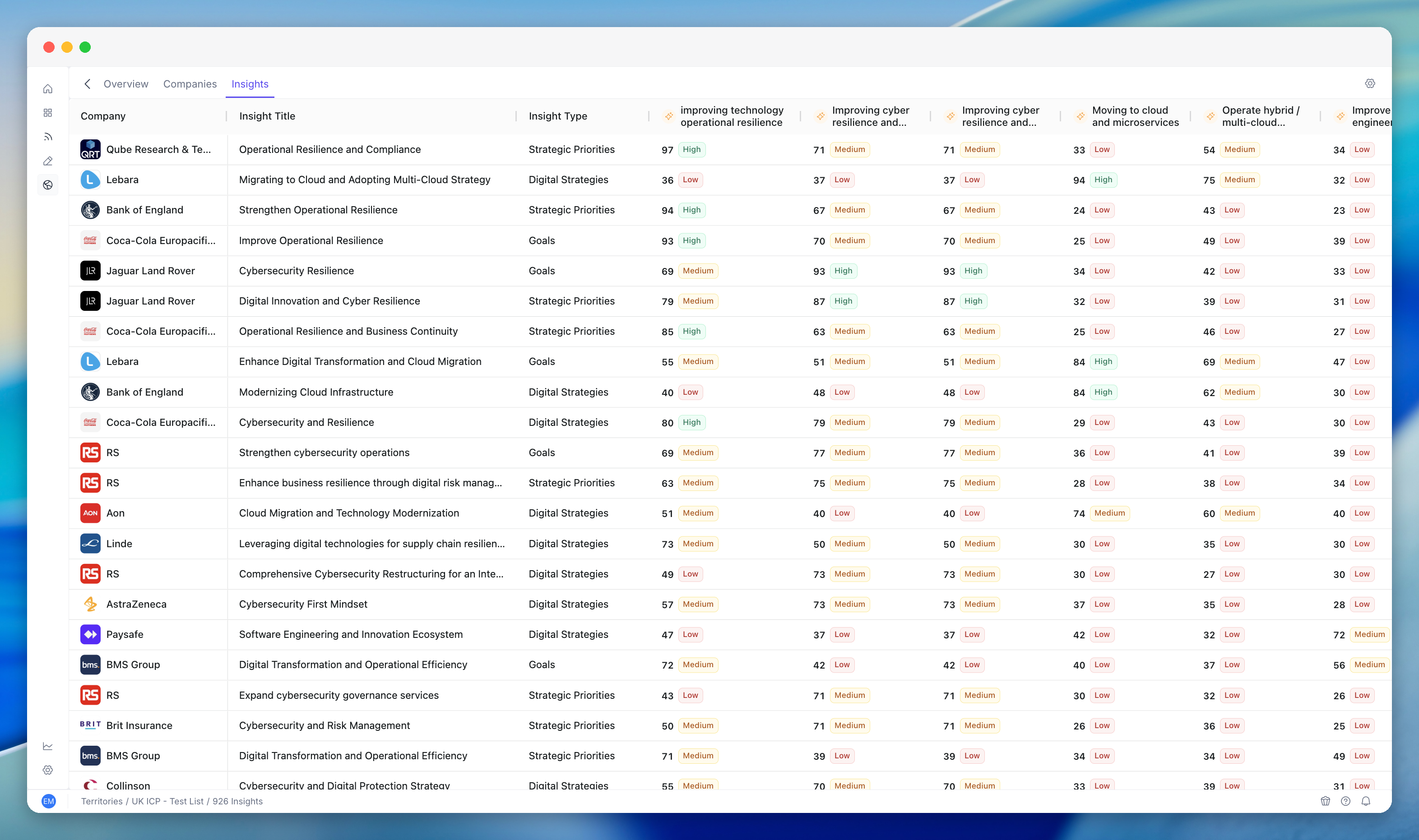
Strategic Insights Scoring lets you define **criteria** - the topics, themes, and strategic initiatives that matter to your business - and then score every account in a territory against them. A criterion might be "cloud transformation initiatives", "AI/ML adoption", or "data engineering investment". The platform scores each account using enriched data (jobs, tech stack, financials, public intelligence), producing a per-account, per-criterion **insight score** that tells you how strongly that account aligns with each topic.
 ## Key Capabilities
Define criteria as strategic topics, themes, or initiatives. Manage your criteria library as your strategy evolves. Describe what each criterion means in business terms.
Scores derived from enrichment data, jobs, tech stack, financials, and public intelligence. Scheduled scoring updates keep criteria current as data changes.
Configure how each criterion evaluates accounts. Group related queries together. Fine-tune which data sources and signals feed into each criterion.
## What Insight Scores Tell You
Each account in your territory has a score for every insight criterion you've defined. If you've set up criteria like "DevOps Transformation" and "Global Expansion", every account gets scored on both.
* **A high score** means the account shows strong signals related to that topic - they're hiring for it, investing in it, or publicly talking about it.
* **A low score** means little to no evidence of activity related to that topic.
## Viewing Insight Scores
### In the Territory Insights Tab
Open your territory and switch to the **Insights** tab. This shows criteria scores aggregated across all territory accounts - which strategic topics your territory is most aligned with overall.
### In the Territory Companies Table
Insight scores can appear as columns in the Companies table. If insight criteria are enabled in your territory's Enriched Columns settings (type: Insights), the scores show alongside other account data.
### On Individual Account Profiles
Click into any account to see per-criterion scores in the account profile. This shows you exactly how each account scores against each strategic topic.
## Common Workflows
### Understanding Why an Account Scores High
Navigate to the account you want to investigate.
Identify which criteria the account scores highest on.
A high score on "Platform Engineering Transformation" means the account is showing signals - hiring platform engineers, adopting relevant tech, publishing content about platform engineering.
Check Jobs data and Tech Stack to see the specific evidence driving the score.
### Comparing Accounts on a Specific Topic
Navigate to your territory's Companies tab.
If the criterion's insight score is visible as a column, sort by it.
See which accounts are strongest and weakest on that specific topic.
Prioritise accounts where your value proposition is most relevant.
### Spotting Opportunities Across Criteria
Look for territory-wide patterns across all criteria.
If "Software Delivery Acceleration" scores high across many accounts, that's a theme you can build messaging around.
If "Global Expansion" scores high for only a few accounts, those are targeted opportunities worth specific attention.
### Using Insight Scores in Conversations
Insight scores give you specifics for personalised outreach:
* "I noticed your company is investing heavily in DevOps transformation - we help companies at this stage by..."
* "Your hiring signals suggest you're accelerating platform engineering - here's how we can help..."
The score gives you confidence. The underlying data (jobs, tech stack, public intelligence) gives you the talking points.
## Interpreting Scores
| Score range | What it means | How to act |
| ----------- | ----------------------------------- | ------------------------------------------------------------------------------ |
| **80–100** | Very strong alignment to this topic | High priority - this account is actively investing in this area |
| **60–79** | Moderate-to-strong signals | Good fit - worth investigating and engaging on this topic |
| **40–59** | Some signals, not definitive | Monitor - may be early stage or the signals are indirect |
| **0–39** | Little to no alignment | This topic isn't a strong angle for this account - try a different criterion |
Scores are relative, not absolute. An 80 means strong signals compared to other accounts, not that 80% of some measure is met.
## Tips and Best Practices
**Don't rely on a single criterion** - look at the pattern across multiple criteria to build a full picture of an account.
**Cross-reference with Jobs** - if an account scores high on "AI/ML Adoption", check if they're actually hiring AI/ML roles. That's the strongest validation.
* **Use criteria scores in scoring models** - insight scores are most powerful when they feed into scoring models, where they're combined with other signals for an overall account rank.
* **Review criteria quarterly** - strategic priorities shift. Update your insight criteria to match your current GTM focus.
* **Share insights with reps** - insight scores give AEs a reason to reach out. Make sure they know how to find and interpret them.
## Related Modules
Insight scores are a primary input to scoring model rules.
Criteria are scoped to territories.
Enrichment data feeds the signals that criteria scores are derived from.
Insight scores surface in analytics views.
## Key Capabilities
Define criteria as strategic topics, themes, or initiatives. Manage your criteria library as your strategy evolves. Describe what each criterion means in business terms.
Scores derived from enrichment data, jobs, tech stack, financials, and public intelligence. Scheduled scoring updates keep criteria current as data changes.
Configure how each criterion evaluates accounts. Group related queries together. Fine-tune which data sources and signals feed into each criterion.
## What Insight Scores Tell You
Each account in your territory has a score for every insight criterion you've defined. If you've set up criteria like "DevOps Transformation" and "Global Expansion", every account gets scored on both.
* **A high score** means the account shows strong signals related to that topic - they're hiring for it, investing in it, or publicly talking about it.
* **A low score** means little to no evidence of activity related to that topic.
## Viewing Insight Scores
### In the Territory Insights Tab
Open your territory and switch to the **Insights** tab. This shows criteria scores aggregated across all territory accounts - which strategic topics your territory is most aligned with overall.
### In the Territory Companies Table
Insight scores can appear as columns in the Companies table. If insight criteria are enabled in your territory's Enriched Columns settings (type: Insights), the scores show alongside other account data.
### On Individual Account Profiles
Click into any account to see per-criterion scores in the account profile. This shows you exactly how each account scores against each strategic topic.
## Common Workflows
### Understanding Why an Account Scores High
Navigate to the account you want to investigate.
Identify which criteria the account scores highest on.
A high score on "Platform Engineering Transformation" means the account is showing signals - hiring platform engineers, adopting relevant tech, publishing content about platform engineering.
Check Jobs data and Tech Stack to see the specific evidence driving the score.
### Comparing Accounts on a Specific Topic
Navigate to your territory's Companies tab.
If the criterion's insight score is visible as a column, sort by it.
See which accounts are strongest and weakest on that specific topic.
Prioritise accounts where your value proposition is most relevant.
### Spotting Opportunities Across Criteria
Look for territory-wide patterns across all criteria.
If "Software Delivery Acceleration" scores high across many accounts, that's a theme you can build messaging around.
If "Global Expansion" scores high for only a few accounts, those are targeted opportunities worth specific attention.
### Using Insight Scores in Conversations
Insight scores give you specifics for personalised outreach:
* "I noticed your company is investing heavily in DevOps transformation - we help companies at this stage by..."
* "Your hiring signals suggest you're accelerating platform engineering - here's how we can help..."
The score gives you confidence. The underlying data (jobs, tech stack, public intelligence) gives you the talking points.
## Interpreting Scores
| Score range | What it means | How to act |
| ----------- | ----------------------------------- | ------------------------------------------------------------------------------ |
| **80–100** | Very strong alignment to this topic | High priority - this account is actively investing in this area |
| **60–79** | Moderate-to-strong signals | Good fit - worth investigating and engaging on this topic |
| **40–59** | Some signals, not definitive | Monitor - may be early stage or the signals are indirect |
| **0–39** | Little to no alignment | This topic isn't a strong angle for this account - try a different criterion |
Scores are relative, not absolute. An 80 means strong signals compared to other accounts, not that 80% of some measure is met.
## Tips and Best Practices
**Don't rely on a single criterion** - look at the pattern across multiple criteria to build a full picture of an account.
**Cross-reference with Jobs** - if an account scores high on "AI/ML Adoption", check if they're actually hiring AI/ML roles. That's the strongest validation.
* **Use criteria scores in scoring models** - insight scores are most powerful when they feed into scoring models, where they're combined with other signals for an overall account rank.
* **Review criteria quarterly** - strategic priorities shift. Update your insight criteria to match your current GTM focus.
* **Share insights with reps** - insight scores give AEs a reason to reach out. Make sure they know how to find and interpret them.
## Related Modules
Insight scores are a primary input to scoring model rules.
Criteria are scoped to territories.
Enrichment data feeds the signals that criteria scores are derived from.
Insight scores surface in analytics views.