> ## Documentation Index
> Fetch the complete documentation index at: https://docs.getpg.ai/llms.txt
> Use this file to discover all available pages before exploring further.
# Tech Stack Intelligence
> Which technologies a company uses, how they trend in job postings, and which ones are gaining or losing traction
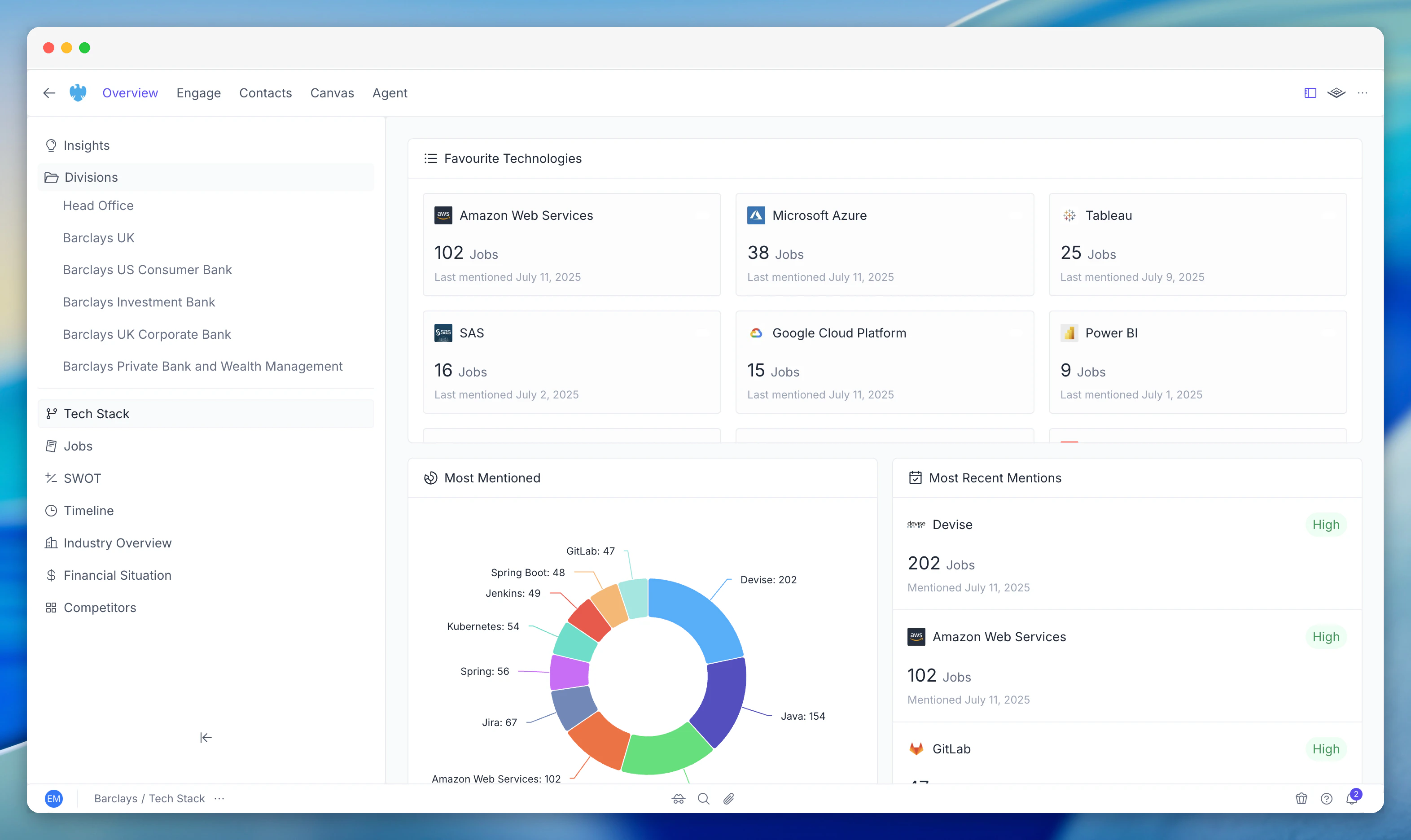
Tech Stack Intelligence shows which technologies a company uses, how frequently they appear in job postings, and which ones are gaining or losing traction. Understand a company's technology landscape without asking.
 Technology data enriches continuously. As new job postings appear and sources update, the technology profile reflects the company's current state.
## What This Module Does
PG:AI builds a technology profile for every account by analysing job postings, public sources, and enrichment data. Instead of manually checking company websites and job boards, you get a structured view of what technologies the company is investing in - including internal tools that don't appear on their website.
Set favourite technologies at the organisation level to track what matters to your business. You'll see job mention counts and last-mentioned dates for each favourite across all accounts.
## Key Capabilities
Technologies you've told PG:AI to track. See job mention counts and last-mentioned dates for each - your at-a-glance view of whether a company is investing in technologies relevant to your sale
Full breakdown of all technologies detected across job postings, displayed as a donut chart ranked by frequency. Reveals the company's overall technology landscape
Technologies referenced recently with recency indicators (High, Medium, Low). Spot emerging trends - a technology suddenly appearing in many job postings signals a new investment
Captures internal technology use from job postings, not just web-facing tools. BuiltWith catches websites; Tech Stack catches what they're building with
## How to Use It
**Account qualification:** Instantly see whether a company uses your product's competitors, complements, or prerequisites. No manual research needed.
**Personalise outreach:** Reference specific technologies in outreach. "I noticed ServiceNow has been increasing its investment in Python and React" is more compelling than a generic message.
**Spot investment signals:** A technology suddenly appearing in many job postings signals a new initiative. Catch it early.
**Solution engineering:** Before a demo, understand the company's tech environment. Know what they're already using so you can position integrations and migrations.
## Related Modules
Job postings are a primary source for technology detection
Technology investments often align with strategic priorities
Technology context enriches discovery questions and value propositions
Technology data enriches continuously. As new job postings appear and sources update, the technology profile reflects the company's current state.
## What This Module Does
PG:AI builds a technology profile for every account by analysing job postings, public sources, and enrichment data. Instead of manually checking company websites and job boards, you get a structured view of what technologies the company is investing in - including internal tools that don't appear on their website.
Set favourite technologies at the organisation level to track what matters to your business. You'll see job mention counts and last-mentioned dates for each favourite across all accounts.
## Key Capabilities
Technologies you've told PG:AI to track. See job mention counts and last-mentioned dates for each - your at-a-glance view of whether a company is investing in technologies relevant to your sale
Full breakdown of all technologies detected across job postings, displayed as a donut chart ranked by frequency. Reveals the company's overall technology landscape
Technologies referenced recently with recency indicators (High, Medium, Low). Spot emerging trends - a technology suddenly appearing in many job postings signals a new investment
Captures internal technology use from job postings, not just web-facing tools. BuiltWith catches websites; Tech Stack catches what they're building with
## How to Use It
**Account qualification:** Instantly see whether a company uses your product's competitors, complements, or prerequisites. No manual research needed.
**Personalise outreach:** Reference specific technologies in outreach. "I noticed ServiceNow has been increasing its investment in Python and React" is more compelling than a generic message.
**Spot investment signals:** A technology suddenly appearing in many job postings signals a new initiative. Catch it early.
**Solution engineering:** Before a demo, understand the company's tech environment. Know what they're already using so you can position integrations and migrations.
## Related Modules
Job postings are a primary source for technology detection
Technology investments often align with strategic priorities
Technology context enriches discovery questions and value propositions